
BIM Automation: Transforming MEP Coordination Workflows
By Tun Zaw Oo · MEP BIM Coordinator (Fire Protection) · ISO 19650-2 PIM Practitioner (BRE Global)
BIM is now essential for project delivery. But as projects become more complex and programmes tighter, using BIM software manually is no longer enough. Much of a coordinator’s time goes on repetitive work: checking parameters, placing sleeves, marking clashes, auditing model health. Automation turns that work into repeatable, checkable workflows, and frees time for what matters: coordination and engineering judgement.
This article explains BIM automation in practical terms, using the Dynamo and Python tools I built and use on live MEP and fire protection projects.
What is BIM automation?
BIM automation uses scripts, plug-ins and specialist tools to perform repetitive BIM tasks automatically. Think of it as teaching your software to do the routine work to a defined standard, every time.
| Manual workflow | Automated workflow (examples from my projects) |
|---|---|
| Place sleeves and wall openings one by one | Sleeves placed at every pipe/wall crossing with a set 50 mm clearance |
| Find clash locations by switching between Navisworks and Revit | Navisworks clash results placed as flags directly in the Revit model |
| Check required parameters element by element | 16,276 sprinklers checked in one run, with failures exported to Excel |
| Check models against BEP rules by hand | Rules read from Excel and tested against every element, with a 3-tab compliance report |
| Set up pipe and duct systems manually | 27 system types, materials and view filters created from one Excel list |
Why BIM automation matters
- Time savings: tasks that take hours by hand can run in minutes.
- Fewer human errors: the same logic is applied to every element, every time.
- Higher productivity: less repetitive work means more time for coordination, constructability and design review.
- Consistent standards: naming, parameters and system set-up follow the BEP automatically.
- Scalability: the same script handles 100 elements or 100,000.
Risk reduction and information control
The biggest benefit is not speed but information quality:
- Automated parameter checks prevent missing asset data at handover
- BEP compliance checks catch non-conforming elements before a model is shared
- Clash flags keep coordination issues visible to the teams who must resolve them
- Model health audits confirm a model is fit to share, with evidence of the check
My automation library: 10 Dynamo and Python tools
I built these tools with Dynamo, Python and the Revit API, and run them from Dynamo Player so the whole team can use them. Each produces a checkable output: an Excel report, colour overrides or placed elements.
| Tool | Problem solved | Example result |
|---|---|---|
| Model QA and information | ||
| BIM Model Health Checker | Manual, inconsistent model health checks | 12 switchable audit modules (including an ISO 19650 module); 106,376 checks run on one model |
| BEP Compliance Checker | BEP parameter rules checked by hand | 46,149 elements tested against 6 rules; 25 non-compliant ducts flagged |
| Missing Parameter Checker | Blank required data found too late | 16,276 sprinklers checked: 29 missing Installation Date, 18 missing K-Factor |
| Coordination and compliance | ||
| Clash Flag Placement | Clash locations not visible in the design model | Navisworks XML → flags placed in Revit and assigned to 4 trade teams |
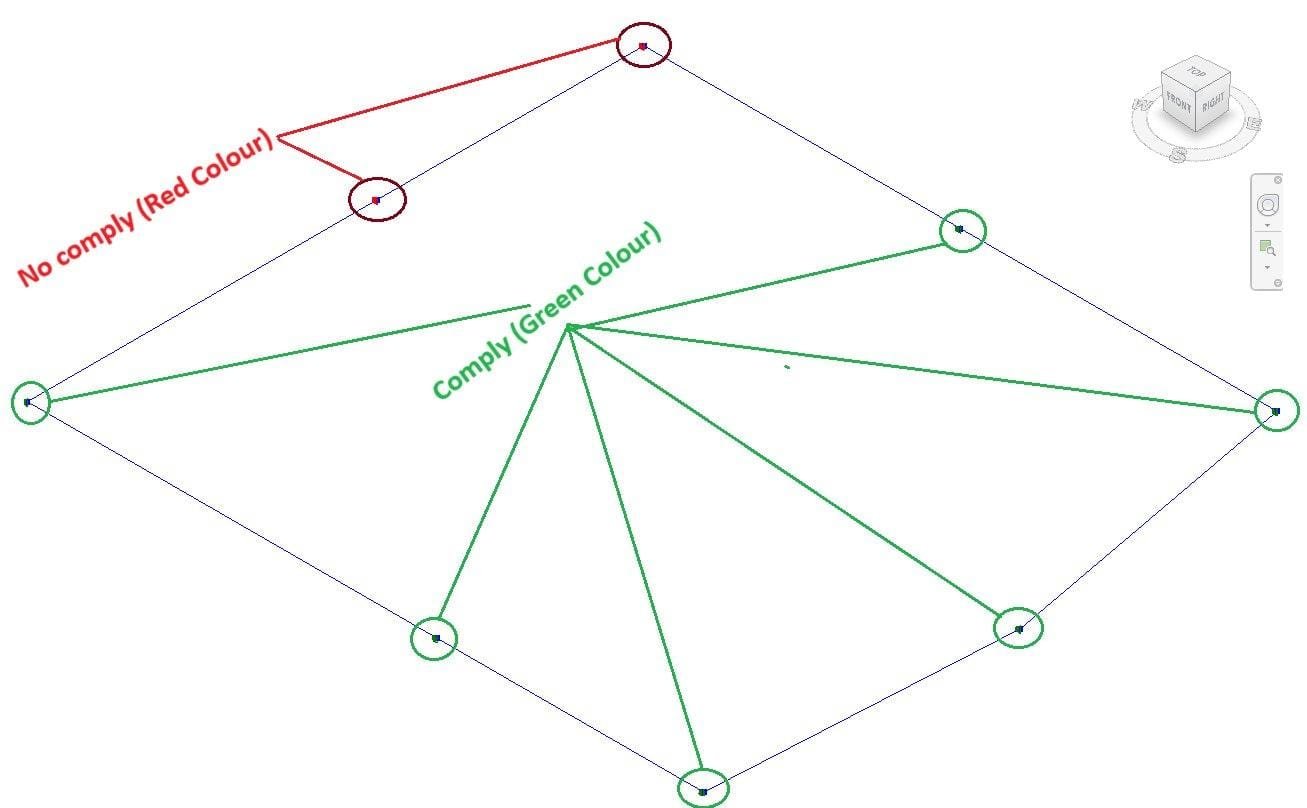
| Fire Hydrant Spacing Checker | Hydrant spacing measured manually | Spacing checked against the design distance, with hydrants colour-coded pass/fail |
| Modelling and delivery | ||
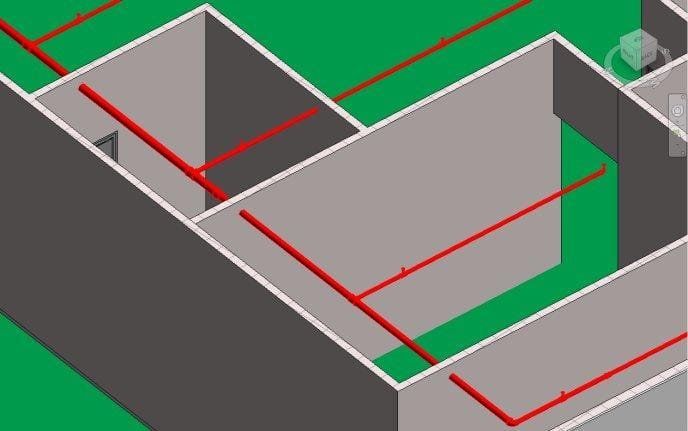
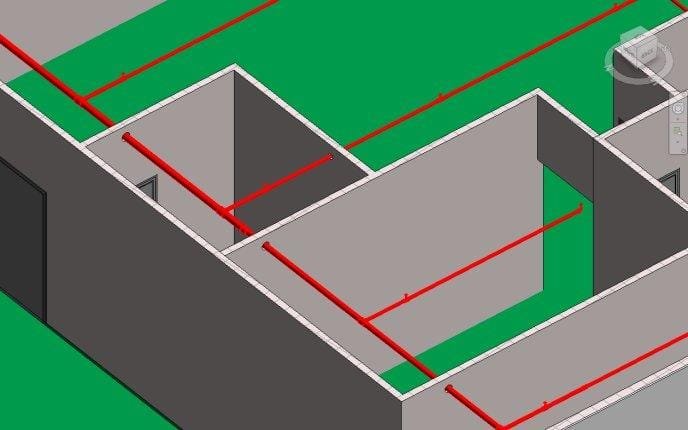
| Pipe Sleeve Placement | Manual sleeves at pipe/wall crossings | Sleeves placed at linked-wall crossings with 50 mm clearance |
| Wall Opening | Manual openings for linked MEP pipes | Coordinated round openings cut in host walls |
| Pipe Hanger Placement | Hangers placed by hand on long runs | 209 pipes processed in one run at 2,000 mm maximum spacing |
| Pipe & Duct Split by Length | Long runs unsuitable for fabrication | Runs split into 6,000 mm prefabrication-ready segments |
| Pipe & Duct System Creation | Slow, inconsistent system set-up | 12 duct + 15 piping system types, materials and filters from Excel |
Across these workflows I estimate repetitive modelling effort is reduced by roughly 95%. The time savings are my own estimates, not formally measured productivity data.
Example 1: BIM Model Health Checker
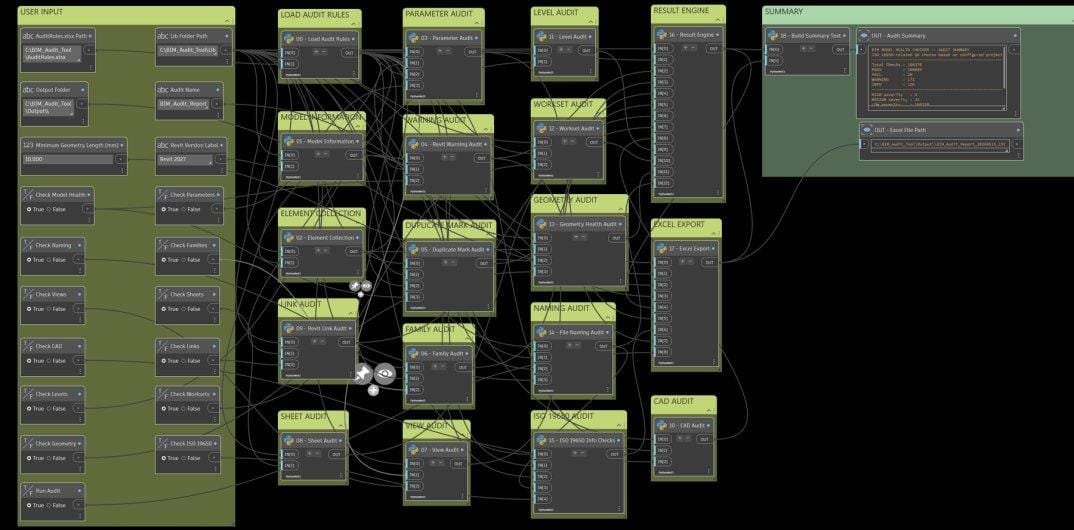
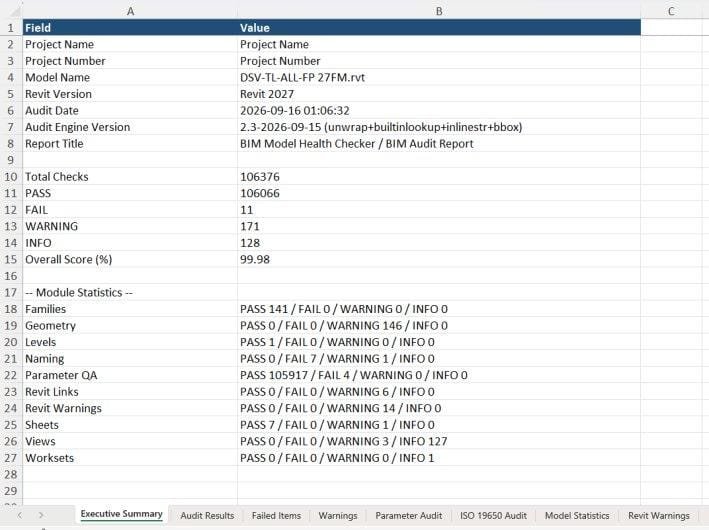
Problem: model health checks were manual and varied by person. Approach: a Dynamo graph with 12 switchable Python audit modules (CAD, families, geometry, levels, links, model health, naming, parameters, sheets, views, worksets and ISO 19650), which writes a multi-tab Excel report. Result: on one model, 106,376 checks ran in about 10 minutes (compared with an estimated 8 hours manually), flagging 11 failures and 171 warnings for review.
Example 2: Missing Parameter Checker for asset data
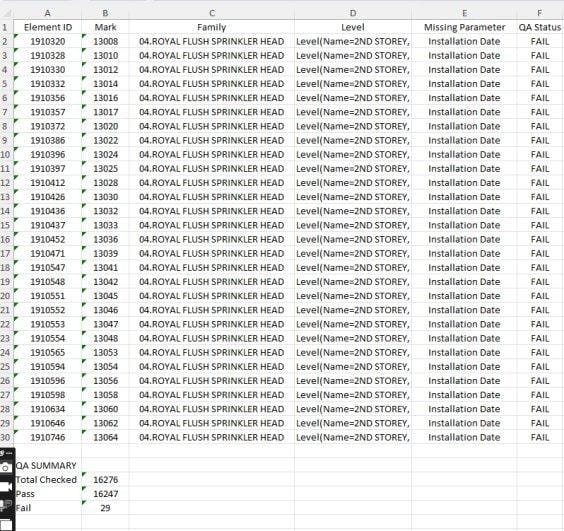
On a large fire protection model, asset data has to be complete before handover. The checker tested 16,276 sprinkler heads in one run and exported 29 missing Installation Dates and 18 missing K-Factors to Excel, each with its element ID, so the gaps could be fixed before the model was shared.
Example 3: Clash flags from Navisworks into Revit
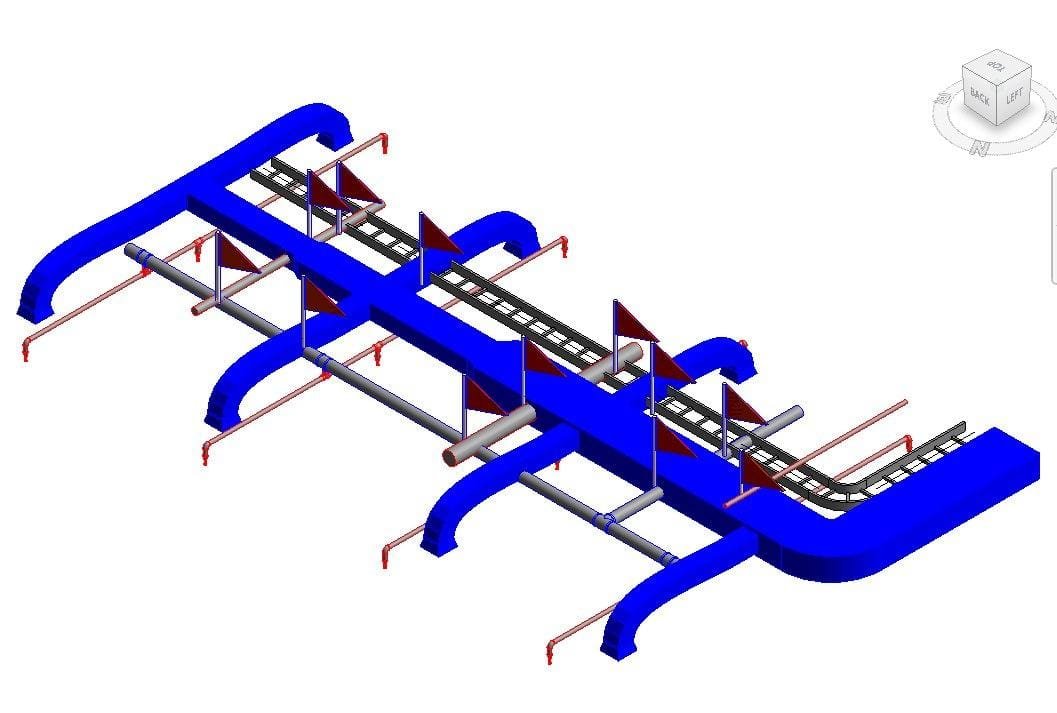
Clash reports are only useful if designers can find the problems. This tool reads the Navisworks clash report (XML), places a flag family at each clash point in Revit, and assigns it to the responsible trade team. Clashes are then visible where the model is actually being edited.
Example 4: Sleeve placement
Example 5: Fire hydrant spacing check
As a fire protection engineer, I also automate design compliance checks. This tool sorts hydrants by their Mark, measures the distance to the next hydrant, compares it with the design distance and colour-codes the results in Revit for engineering review.
Common BIM automation applications
- Model creation and population: rule-based placement of equipment, sleeves and hangers; parameter population from Excel
- Quality control: naming, parameter completeness (Level of Information Need), worksets, warnings and BEP rule checks
- Coordination: scheduled clash tests, clash grouping by system and level, clash flags, issue tracking in BCF/Revizto
- Documentation: batch views, sheets, schedules and PDF exports
- Data exchange: Excel round-tripping, COBie and asset data preparation, links to cost and FM systems
- Analysis and optimisation: option testing, energy and daylight iterations, generative design
Tools and technologies
| Tool | Best for |
|---|---|
| Dynamo | Visual scripting inside Revit; the quickest route into automation |
| Python (in Dynamo, pyRevit) | Complex logic, Revit API access, data processing and reports |
| C# and the Revit API | High-performance, long-lived add-ins |
| Autodesk Platform Services (formerly Forge) | Cloud automation, including the Design Automation API and webhooks |
| Speckle | Open-source data exchange between applications, with version history |
| Autodesk Construction Cloud | CDE workflows, automated clash detection in Model Coordination, issues |
| Excel and Power Query | Rule tables, reports and data round-tripping, often all a coordinator needs |
Governing automation
Scripts can damage a model as quickly as they improve it, so I follow a few rules:
- Every output is checkable: Excel reports, colour overrides or placed elements that a reviewer can verify
- Rules live outside the script: BEP rules and system lists are kept in Excel, so standards change without editing code
- Tested before live use: scripts are run on a copy or a limited selection first
- Run through Dynamo Player: team members use tools with clear inputs, without editing graphs
The future of BIM automation
- AI integration: suggested clash resolutions, automated rule checking, predictive planning
- Cloud-based automation: model processing without local hardware, triggered from the CDE
- Machine-readable requirements: buildingSMART’s Information Delivery Specification (IDS) lets clients define data requirements that software checks automatically
- Digital twins and IoT: automated updates from sensor data and predictive maintenance
Conclusion
BIM automation is not about replacing BIM professionals; it is about making them more effective. My tools didn’t remove the need for coordination. They removed the repetitive work around it, and they made quality checks consistent and provable.
Start small: pick one repetitive task, automate it, make the output checkable, then share it with your team. Each tool you build pays back on every project that follows.
Related: ISO 19650 in MEP: a real task-team case study · BIM for Facility Management